blob: 0ad979cca01dd84e62f507424e2792f847a66d38 (
plain)
1
2
3
4
5
6
7
8
9
10
11
12
13
14
15
16
17
18
19
20
21
22
23
24
25
26
27
28
29
30
31
32
33
34
35
36
37
38
39
40
41
42
43
44
45
46
47
48
49
50
51
52
53
54
55
56
57
58
59
60
61
62
63
64
65
66
67
68
69
70
71
72
73
74
75
76
77
78
79
80
81
82
83
84
85
86
87
88
89
90
91
92
93
94
95
|
# My Firefox userChrome.css
This is my Firefox `userChrome.css`.
This `userChrome` was originally based on tweaks from
[xiaoxiaoflood/firefox-scripts](https://github.com/xiaoxiaoflood/firefox-scripts),
but I was not satisfied with the way many of these looked and so I spent some
time to get them looking like they belong.
In addition to looking nice, this also attempts to make the browser more
minimal and more functional by removing clutter and maximizing vertical space.
## Features
* Auto one-line top bar (combines tabs and navbar).
Automatically disabled when the window gets too small via a `media query`
* Chromium style findbar in top right corner
* Consistent placement of new tab button in the top right
* Remove overflow button for tabs and navbar
* Enhanced bookmarks bar readability (adj. margins and padding)
* Widely compatible with Firefox themes
* Compact mode targeted for maximum reading area
## Preview
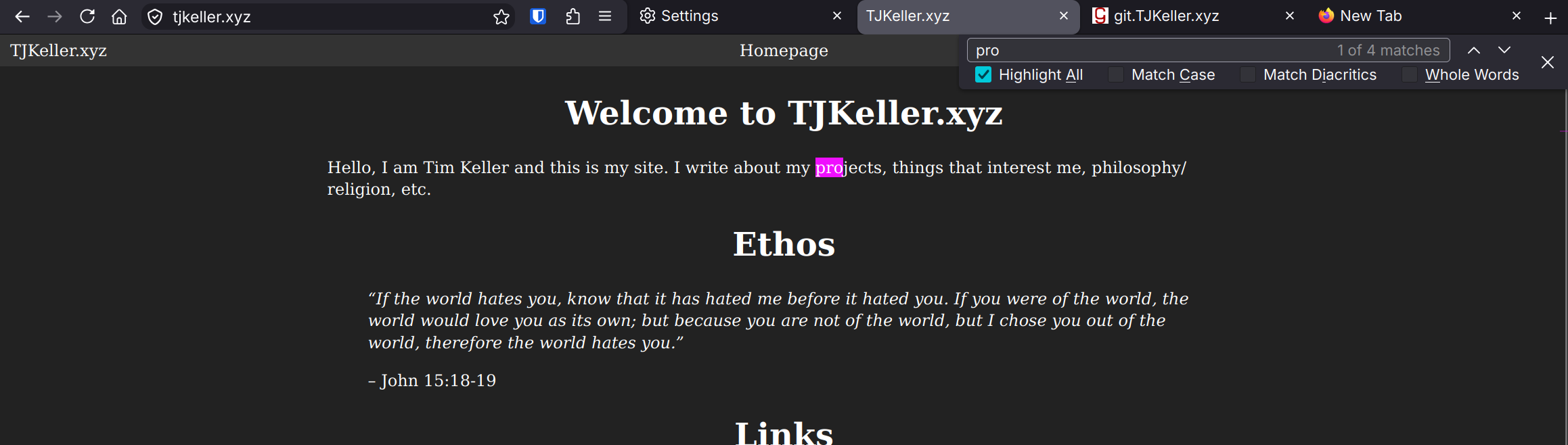
*Wide UI*
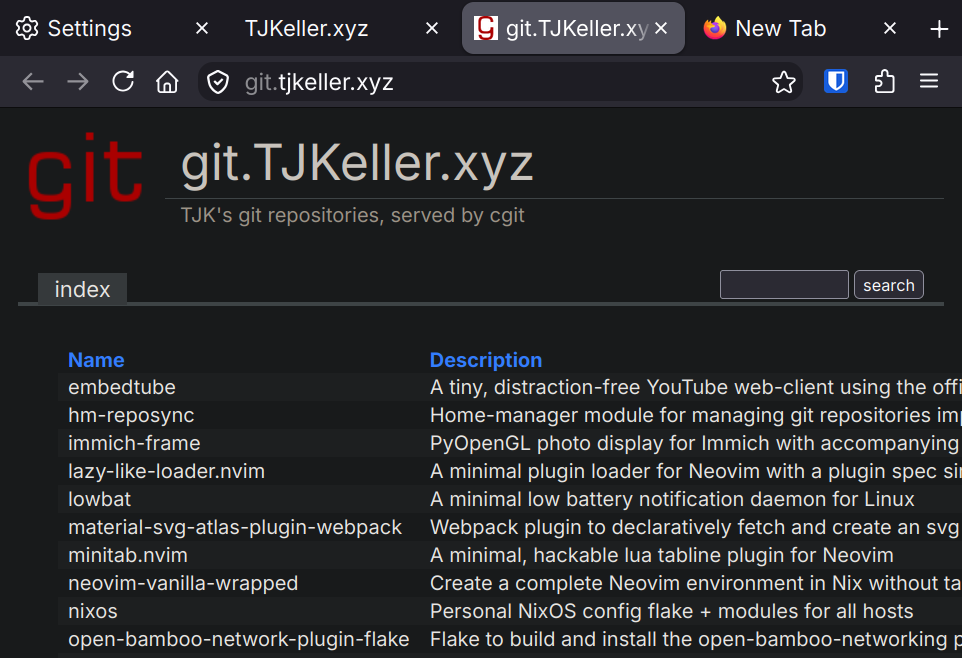
*Slim UI*
## Setup
To begin, it is highly suggested that you set `density` to `compact` in the
"Customize Toolbar" menu in order to sace additional vertical space. Note that
this `userChrome` is designed and tested only with `compact` mode, other modes
are not supported.
It is suggested to install this via [home-manager](https://home-manager.dev/).
If you are not already using `home-manager`, then refer to
[Legacy installation](#legacy-installation).
### Home-manager (Nix) installation (suggested)
First, refer to this example `flake.nix` that you might use for a
`home-manager` setup:
```nix
{
inputs = {
nixpkgs.url = "github:NixOS/nixpkgs/nixos-unstable";
home-manager = {
url = "github:nix-community/home-manager";
inputs.nixpkgs.follows = "nixpkgs";
};
firefox-userchrome.url = "git://git.tjkeller.xyz/firefox-chrome";
};
outputs = { nixpkgs, home-manager, firefox-userchrome, ... }: {
homeConfigurations.timmy = home-manager.lib.homeManagerConfiguration {
pkgs = nixpkgs.legacyPackages.x86_64-linux;
extraSpecialArgs = { inherit firefox-userchrome; };
modules = [ ./home.nix ];
};
};
}
```
Then configure Firefox in `home-manager` (`./home.nix` in this case) as
follows:
```nix
{ firefox-userchrome, ... }: {
programs.firefox = {
enable = true;
profiles.Personal = {
id = 0;
isDefault = true;
userChrome = firefox-userchrome.userChrome;
settings = {
"browser.compactmode.show" = true;
"browser.uidensity" = 1; # Compact
};
};
};
# ...
}
```
### Legacy installation
To setup `compact` mode, you will need to set the following in `about:config`:
* `browser.compactmode.show` = `true`
* `browser.uidensity` = `1`
(or set this in the aformentioned "Customize Toolbar" menu)
You can then enable the `userChrome` settings and install `userChrome.css` in
your profile as described
[here (userchrome.org)](https://www.userchrome.org/how-create-userchrome-css.html)
and elsewhere. Note that the easiest way to manage this is to `git clone` the
repository directly into the `chrome` directory located within your profile
(e.g. `~/.config/mozilla/firefox/Personal/chrome`).
|
